
Technology I wanna build my own PC
- Thread starter Kryogenikz
- Start date
You are using an out of date browser. It may not display this or other websites correctly.
You should upgrade or use an alternative browser.
You should upgrade or use an alternative browser.
sweet. I thought that was basically the processor's speed for......but i guess they go hand in hand when it comes to loading programs or whatever.
Ok, my next question is what's the main advantage of having a dual core processor?
Ok, my next question is what's the main advantage of having a dual core processor?

Kryogenikz said:sweet. I thought that was basically the processor's speed for......but i guess they go hand in hand when it comes to loading programs or whatever.
Ok, my next question is what's the main advantage of having a dual core processor?
Basicly the advantage is that most companies have maxed out processor speeds. They figure they could put two processors together to make it faster. It is two processor cores on one die like having a dual processor system in one processor. The two chips can talk back and forth to each other at a faster speed with better throughput. It gives it faster bus time between system memory and the motherboard. But to not get all technical dual core processing is good for "multitasking". Like downloading music, gaming, burning stuff or just running alot of programs at the same time.
thanks guys 4 the help, i definetely repped everybody 4 their input. i just placed my order an hour ago 2 get started.
Ordered a computer case, a hard drive, 3 fans, and a gaming keyboard (pretty much just cuz i wanna use it now).
My next order should be a psu, processor and mobo.
Ordered a computer case, a hard drive, 3 fans, and a gaming keyboard (pretty much just cuz i wanna use it now).
My next order should be a psu, processor and mobo.
Kryogenikz said:thanks guys 4 the help, i definetely repped everybody 4 their input. i just placed my order an hour ago 2 get started.
Ordered a computer case, a hard drive, 3 fans, and a gaming keyboard (pretty much just cuz i wanna use it now).
My next order should be a psu, processor and mobo.
where r u ordering from/?
by the way, building your own computer is the best way to do it. you know whats in there. usually namebrand computers put a bunch of crap in there.
ordering my stuff from newEGG, they seem 2 have the best prices on the net. Not 2 mention fast shipping.
I ordered my RAM from there about a month ago and it only took about 3 days for it 2 arrive and that was on the lowest shipping and handling. Like $3 for the "super savings express". It's according 2 the size of your order of course, this time shipping was about $35 .....my total order was $336 (including shipping)
I ordered my RAM from there about a month ago and it only took about 3 days for it 2 arrive and that was on the lowest shipping and handling. Like $3 for the "super savings express". It's according 2 the size of your order of course, this time shipping was about $35 .....my total order was $336 (including shipping)
Kryogenikz said:Ordered a computer case, a hard drive, 3 fans, and a gaming keyboard (pretty much just cuz i wanna use it now).
My next order should be a psu, processor and mobo.
Care to share what parts you got? Just curiuos cause I build my own systems also.
no problem...
2 ASPIRE CF4SL-4C 80mm Multi-Color LED Light Cooling Fan - Retail
Item #: N82E16811998108 $10.00
1 ASPIRE CF12SL-UBL 120mm Blue LED Light Cooling Fan - Retail
Item #: N82E16811998121 $8.00
1 Western Digital Caviar SE WD3200JD 320GB 7200 RPM Serial ATA150 Hard Drive - OEM
Item #: N82E16822144394 $170.00
1 ideazon Zboard Gaming PW1USE1-B3ZBD01 2-Tone USB Wired Standard Keyboard - Retail
Item #: N82E16823161013 $43.00
Item(s) shipped from TN Tracking Number:
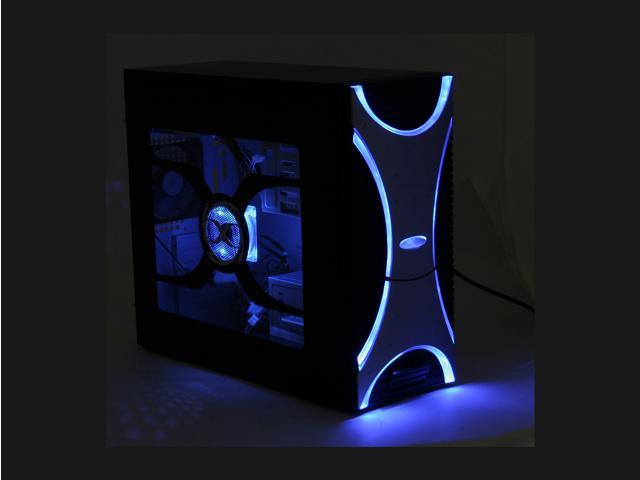
1 XION Ultimate Engineering XON-002 Black/Silver Steel ATX Mid Tower Computer Case 450W Power Supply - Retail
Item #: N82E16811208004 $64.99
also have two 512 sticks of RAM i ordered a month ago, they're OCZ's. What you have?
2 ASPIRE CF4SL-4C 80mm Multi-Color LED Light Cooling Fan - Retail
Item #: N82E16811998108 $10.00
1 ASPIRE CF12SL-UBL 120mm Blue LED Light Cooling Fan - Retail
Item #: N82E16811998121 $8.00
1 Western Digital Caviar SE WD3200JD 320GB 7200 RPM Serial ATA150 Hard Drive - OEM
Item #: N82E16822144394 $170.00
1 ideazon Zboard Gaming PW1USE1-B3ZBD01 2-Tone USB Wired Standard Keyboard - Retail
Item #: N82E16823161013 $43.00
Item(s) shipped from TN Tracking Number:
1 XION Ultimate Engineering XON-002 Black/Silver Steel ATX Mid Tower Computer Case 450W Power Supply - Retail
Item #: N82E16811208004 $64.99
also have two 512 sticks of RAM i ordered a month ago, they're OCZ's. What you have?
Lite on dvd-rom.
Plextor 42x RW.
2.2 Gighz celeron processor.
Asus motherboard.
60 gig Western digital 7200 rpms. (Good drives)
Radeon 9800 pro AGP video card.
Soundblaster live paltinum sound card.
My case is grey with two blue fans with the big window above them and I got a blue neon strip inside the case. Gotta love the neon for computers. Im gonna build another machine soon.
Left out ram- 1.5 gig kingston.
Plextor 42x RW.
2.2 Gighz celeron processor.
Asus motherboard.
60 gig Western digital 7200 rpms. (Good drives)
Radeon 9800 pro AGP video card.
Soundblaster live paltinum sound card.
My case is grey with two blue fans with the big window above them and I got a blue neon strip inside the case. Gotta love the neon for computers. Im gonna build another machine soon.
Left out ram- 1.5 gig kingston.
Meyer Lansky said:Lite on dvd-rom.
Plextor 42x RW.
2.2 Gighz celeron processor.
Asus motherboard.
60 gig Western digital 7200 rpms. (Good drives)
Radeon 9800 pro AGP video card.
Soundblaster live paltinum sound card.
My case is grey with two blue fans with the big window above them and I got a blue neon strip inside the case. Gotta love the neon for computers. Im gonna build another machine soon.
Left out ram- 1.5 gig kingston.
good shit. i am going to be building a new system next week hopefully. It's gonna be my gaming machine.
Meyer Lansky said:Lite on dvd-rom.
Plextor 42x RW.
2.2 Gighz celeron processor.
Asus motherboard.
60 gig Western digital 7200 rpms. (Good drives)
Radeon 9800 pro AGP video card.
Soundblaster live paltinum sound card.
My case is grey with two blue fans with the big window above them and I got a blue neon strip inside the case. Gotta love the neon for computers. Im gonna build another machine soon.
Left out ram- 1.5 gig kingston.
sweet....thats the same video card i wanna get 2...right now i gotta 9700 and it works just fine, but u know, gotta upgrade just 4 the sake of it.
how much did you spend total? I'm aiming for $1,000 or less.
Kryogenikz said:how much did you spend total? I'm aiming for $1,000 or less.
the processor im getting will cost me almost $1000 alone. the whole system will cost like 3 grand.

damn, that's one mighty processor....i'm looking at these 2, and i can't really decide
intel Pentium D 820 Smithfield 800MHz FSB 2 x 1MB L2 Cache LGA 775 Dual Core, EM64T Processor
Dual Core and
2.8 Ghz
intel Pentium 4 630 Prescott 800MHz FSB 2MB L2 Cache LGA 775 EM64T Processor - Retail
Single core but 3.0 Ghz
intel Pentium D 820 Smithfield 800MHz FSB 2 x 1MB L2 Cache LGA 775 Dual Core, EM64T Processor
Dual Core and
2.8 Ghz
intel Pentium 4 630 Prescott 800MHz FSB 2MB L2 Cache LGA 775 EM64T Processor - Retail
Single core but 3.0 Ghz
Also have a question about USB ports. Does the Computer Case/shell come with them and i just have 2 install/hook them up? Or does the case just come with the empty spaces/holes for the USB ports but i have 2 get them myself from somewhere else?


^^
you can buy pci cards for anything. usb ports, firewire ports, joystick port, extra ide/raid connections, and so on.
all in all, building your own computer isn't a big deal really. it's kinda weird the first time. your case is probably gonna have some anti-magnetic thing that you strap on your arm to make sure you don't ruin the circuits with static electricity.
you can buy pci cards for anything. usb ports, firewire ports, joystick port, extra ide/raid connections, and so on.
all i needed was a couple of different-sized screw drivers. i had three, only used two. you use screws to fasten everything, the motherboard, etc. screws come with the case and most of the parts that require screws have screws with them. this probably only applies to the cpu and cpu cooler/fan in your case. you get cooling paste for your cpu with the cpu when you buy it most probably. so yeah, all you need is screw drivers. just make sure you refer to the motherboard manual to make sure you put all the leds and buttons in their right spots. when i built my first pc i didn't, so the power button didnt work. also, if you're gonna use more than one harddrive, make sure the master/slave settings are correct. you use little pins for this and they normally come with the hdd. once again, refer to the manual. it's really simple.Kryogenikz said:i have a pretty good idea of where 2 put everything and most connections....so uhm, does anybody think or recommend any special tools? for example, i think i would need some needle nose plyers........something else that i see being sold alot is "computer glue" uhm...is this really for repairs or am i supposed 2 use it 4 something else...like gluing the motherboard down or something.
also, is there any welding involved?
all in all, building your own computer isn't a big deal really. it's kinda weird the first time. your case is probably gonna have some anti-magnetic thing that you strap on your arm to make sure you don't ruin the circuits with static electricity.
cool ^^^
From what i understand, most cases will come with instructions...unfortunately, the case i ordered, from what i hear, comes with instructions but pretty crappy ones. So does the mobo come with it's own instructions 2?
From what i understand, most cases will come with instructions...unfortunately, the case i ordered, from what i hear, comes with instructions but pretty crappy ones. So does the mobo come with it's own instructions 2?
Kryogenikz said:cool ^^^
From what i understand, most cases will come with instructions...unfortunately, the case i ordered, from what i hear, comes with instructions but pretty crappy ones. So does the mobo come with it's own instructions 2?
you just screw on the motherboard to the case.
but the motherboard has some jumpers that you might have to change depending on your processor. the manual will tell you what jumpers do what. for example,your processor might need a certain jumper setting. Most of these can be changed in the BIOS,but i once bought a mobo that i needed to change the setting for my cpu to work properly.
Kryogenikz said:Also have a question about USB ports. Does the Computer Case/shell come with them and i just have 2 install/hook them up? Or does the case just come with the empty spaces/holes for the USB ports but i have 2 get them myself from somewhere else?
they one the mobtherboard on the back, and if your case has front ones, these just plug into ur mobo

Donate
Back in the day, we used to recieve donations sent as cash in fake birthday cards! Those were the days! I still have some of them, actually.
Now we have crypto.
Ethereum/EVM: 0x9c70214f34ea949095308dca827380295b201e80
Bitcoin: bc1qa5twnqsqm8jxrcxm2z9w6gts7syha8gasqacww
Solana: 8xePHrFwsduS7xU4XNjp2FRArTD7RFzmCQsjBaetE2y8
Now we have crypto.
Ethereum/EVM: 0x9c70214f34ea949095308dca827380295b201e80
Bitcoin: bc1qa5twnqsqm8jxrcxm2z9w6gts7syha8gasqacww
Solana: 8xePHrFwsduS7xU4XNjp2FRArTD7RFzmCQsjBaetE2y8